📥 Syncing
Want to read more?
I wrote my master's thesis on comparing syncing strategies. Here are the presentation slides which summarize my findings.
Meerschaum efficiently syncs time-series data in three basic ETL steps: fetch, filter, and upsert.
Syncing Stages
The primary reason for syncing in this way is to take advantage of the properties of time-series data. Note that when writing your plugins, you only need to focus on getting data within begin and end bounds, and Meerschaum will handle the rest.
- Fetch (Extract and Transform)
Because most new data will be newer than the previous sync, the fetch stage returns rows greater than the previous sync time (minus a backtracking window).
Example fetch query
- Filter (remove duplicates)
After fetching the latest rows, the difference is taken to remove duplicates.
Skip filtering
To skip the filter stage, use --skip-check-existing or pipe.sync(check_existing=False).
Example filter query
-
Upsert (Load)
Once new rows are fetched and filtered, they are inserted into the database table via the pipe's instance connector. If
upsertis set in the pipe's parameters, then inserts and updates are performed in one query.
Example upsert queries
Backtracking
Depending on your data source, sometimes data may be missed. When rows are backlogged or a pipe contains multiple data streams (i.e. an ID column), a simple sync might overlook old data.
Add a backtrack interval
The backtrack interval is the overlapping window between syncs (default 1440 minutes).
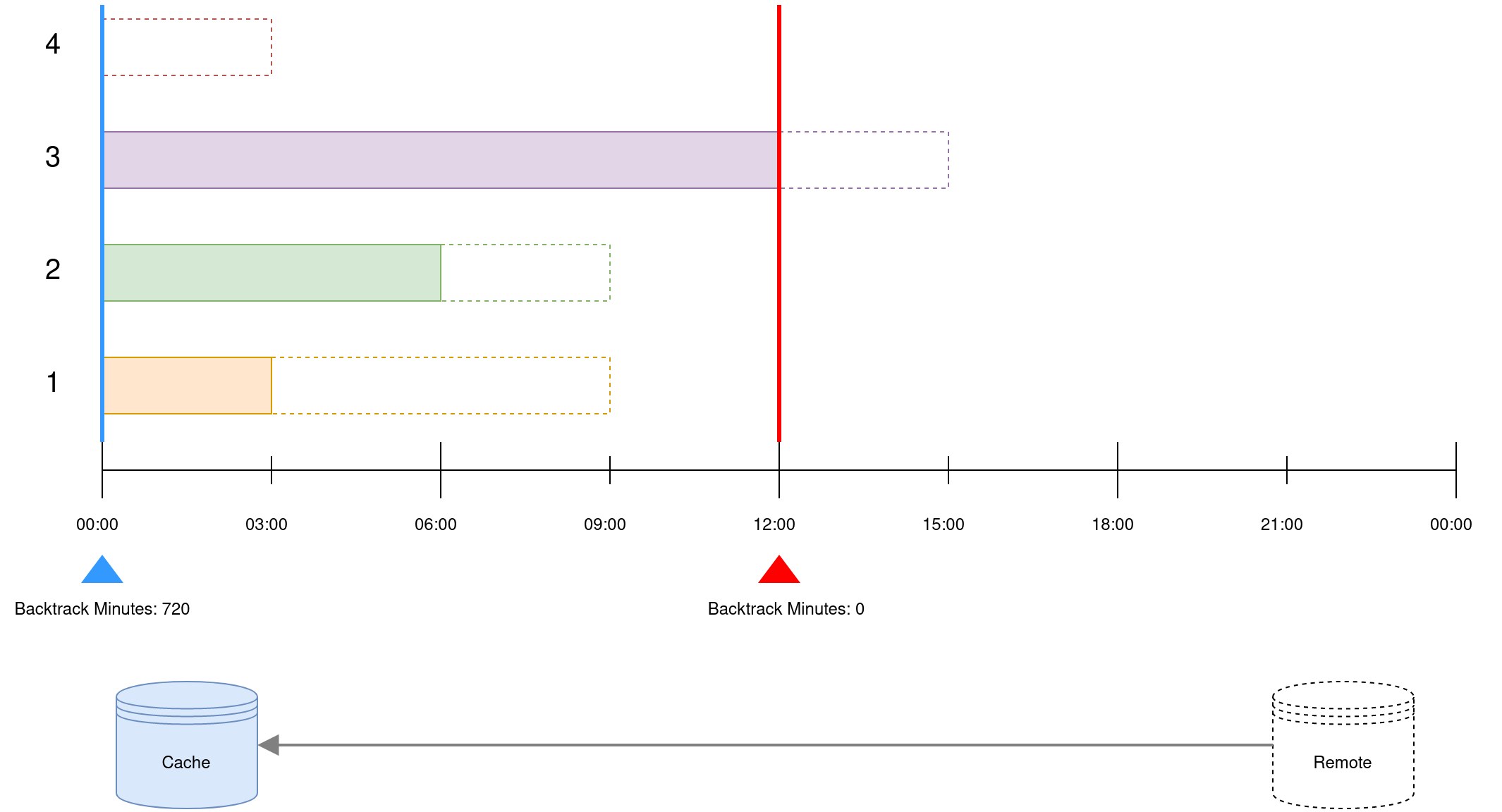
In the example above, there are four data streams that grow at separate rates — the dotted lines represent remote data which have not yet been synced. By default, only data to the right of the red line will be fetched, which will miss data for the "slower" IDs.
You can modify the backtrack interval under the key fetch:backtrack_minutes:
Verification Syncs
Occasionally it may be necessary to perform a more expensive verification sync across the pipe's entire interval. To do so, run verify pipes or sync pipes --verify:
A verification sync divides a pipe's interval into chunks and resyncs those chunks. Like the backtrack interval, you can configure the chunk interval under the keys verify:chunk_minutes:
When run without explicit date bounds, verification syncs are bounded to a maximum interval (default 366 days). This value may be set under verify:bound_days (or minutes, days, hours, etc.):
Deduplication Syncs
Although duplicates are removed during the filter stage of a sync, duplicate rows may still slip into your table if your data source returns duplicates.
Just like verification syncs, you can run deduplicate pipes to detect and delete duplicate rows. This works by deleting and resyncing chunks which contain duplicates.
Your instance connector must provide either clear_pipe() or deduplicate_pipe() methods to use pipe.deduplicate().
Combine --verify and --deduplicate.
You run mrsm sync pipes --verify --deduplicate to run verification and deduplication syncs in the same process.